Five practical ways chamber teams can put AI to work today
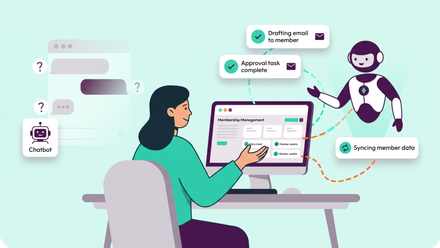
Most chamber teams are small, and the amount they deliver is not. Between events, training, trade services, policy work and keeping several thousand business relationships warm, there is rarely time to pull a report together, let alone study it. That's where AI earns its place, not as a chatbot floating in the corner of your website but as a tool that works with your own live member data and takes routine work off your team's plate.
When Coventry and Warwickshire Chamber of Commerce chose a new platform this year, AI was central to the decision. Chief Executive Corin Crane explained why:
We were doing some really, really time-consuming tasks that we just weren't using AI for. For our staff, that's important about how they do various things. Equally, we want a portal where our members and the people we work with can use AI to search and find information out as well.
Here are five ways chambers can use AI built into ReadyMembership, taken from a demo I gave at our Future-ready chambers webinar in October 2026.
1. Spot members at risk before renewal
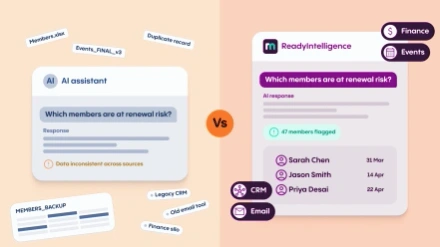
Instead of building a report, you can ask a question in plain English, such as "which member organisations renewing in the next 90 days are at high, medium or low risk of not renewing, and why?" The assistant looks at subscription and engagement data and sorts the members by risk. It also explains the reasons, such as a cancelled direct debit, unanswered renewal reminders or no event attendance or logins. Because it knows what the platform can do, it suggests next steps too, from targeted event offers to a bulk reminder email.
You can go a step further and ask what the members who lapsed or cancelled this year had in common, then apply those patterns to the members coming up for renewal next. That means your team spends its time on the calls that matter rather than ringing everyone.
2. Prepare for a member call in seconds
Before a call with a large member, ask for a membership benefit report on that organisation. You'll get their grade, how long they've been a member, how many contacts they have and their active subscriptions. It also covers their email engagement, portal logins, form submissions, and events booked, attended and cancelled. You can then ask follow-up questions, so you walk into the conversation knowing exactly how the business uses its membership.
3. Get prospect lists into your pipeline
Many chambers regularly work through lists of local businesses. Rather than keying them in, you can upload a spreadsheet to the assistant and ask it to create the organisations, contacts and membership opportunities in the CRM. You can split the opportunities between your sales team, assign owners and set a deadline for first contact. Every note, call and email is then recorded in one place, and once a prospect joins, their whole history stays with them.
4. Answer members and prospects around the clock
The same intelligence can sit on your website. For a public visitor, the assistant answers questions from your public content and can promote membership and events. Once a member logs in, it knows who they are, including their membership level, renewal date, payment method, bookings and past purchases. It can recommend upcoming events based on their profile, explain which benefits they're entitled to, and add them to relevant mailing lists, such as sponsorship opportunities, within the conversation.
Because it uses AI-powered search rather than keyword matching, it understands what people mean, not just the words they type. It searches your web pages, documents and even videos, citing its source and linking to the exact point in a recording where the answer appears.
5. Learn what your members need
Every member conversation with the assistant is logged, so your team can review what businesses are asking about and what they struggle to find. That gives you a clear view of content gaps and emerging issues, which is useful for planning content, events and even policy work.
Can we trust it with our data?
It's an important question to ask of any AI tool. ReadyIntelligence is built into ReadyMembership, so it works from your live data rather than a separate copy that goes out of date. Answers come only from your own content, with the source cited, rather than from guesswork. The AI only sees what each user is allowed to see, and you can set sensitive topics to be handed to a member of staff instead of answered. Pixl8 is ISO 27001 certified, data is hosted in the UK and EU, and your data is never used to train AI models.
UK AI, the trade association for the UK's AI sector, runs on ReadyMembership and ReadyIntelligence itself. It's a small team doing a great deal with the platform.
See it for yourself
I'll be going through all of this in much more detail, live and with time for your questions, at our AI for chambers webinar on Wednesday, 18 November, from 12:30 to 1:30pm. It's free and tailored for chambers of commerce. Reserve your place.