7 things your membership portal should do automatically
Most membership teams are more capable than their technology. They know what good looks like — responsive communications, frictionless renewals, a member experience that feels joined up rather than patched together — but their day is too often consumed by tasks the system should be handling in the background. If that sounds familiar, the issue usually isn’t the team. It’s the portal.
A well-configured membership portal doesn’t just store data and display a login page. It works. It handles the routine, the repetitive, and the time-sensitive, without someone needing to trigger it manually each time. Here are seven things your member portal should be doing automatically, and what it means for your organization when it does.

Collect renewal payments without anyone chasing them
Renewal season absorbs a disproportionate amount of membership team time, and for many organizations the root cause is simple: the system isn’t collecting payments, so the team is. A properly configured membership portal handles this differently. Members paying by direct debit or recurring card are renewed automatically at the right date, with payment collected without staff involvement. If a payment fails, the portal retries it, notifies the member, and displays the status clearly in their account rather than leaving them confused and the team fielding calls.
The difference this makes in practice is significant. NACA, the National Association of Campus Activities, went from three staff members managing renewals to one after moving to a unified membership management platform. That’s not a marginal efficiency gain; it’s a fundamental shift in how the team spends its time.

Send payment reminders that escalate without manual intervention
For members not on an automatic payment method, the portal should still be doing the work. A well-configured system sends a sequence of escalating reminders at intervals you define, with messaging that reflects where in the cycle the member is. An early reminder looks and reads differently from one sent after a grace period has passed, and both should go out automatically based on the member’s account status, not because someone exported a list and scheduled an email that morning.
This matters because inconsistency in the reminder process is one of the most common causes of preventable lapse. Members who would have renewed given a timely nudge fall through the gap because the reminder never went out, or went out too late, or said the same thing three times in a row without increasing any sense of urgency. The portal should manage this sequence reliably, every time, for every member.

Give members control over their own account
One of the clearest signals that a member portal isn’t working well is a high volume of routine support queries: members emailing to update their address, calling to change their membership grade, or asking staff to resend an invoice. These are tasks members expect to handle themselves, and when they can’t, the friction lands on your team.
A well-configured member self-service portal puts profile updates, billing changes, subscription grade switches, and invoice access directly in the hands of the member. For organizational memberships, the designated contact should be able to add and remove users from their organization’s account without staff involvement. The goal isn’t to make the portal do everything — it’s to make sure the portal handles what members reasonably expect to do independently, so your team’s attention is available for things that genuinely need it.

Switch member benefits on and off based on membership status
Member benefits that require manual activation or removal create two problems at once: a poor member experience and an ongoing admin overhead. A member who has just renewed should have immediate access to everything their membership includes, without waiting for a staff member to update a permission. A member whose payment has lapsed should have that access restricted automatically, without anyone needing to notice and act.
The mechanism behind this is a rules engine that links subscription status directly to access rights across your platform, including gated content, member-only pricing on events, early-bird ticket access, and member directory inclusion. Once configured, it runs without intervention. The benefits follow the membership status, not the admin queue.

Personalize what each member sees when they log in
A portal that shows every member the same homepage regardless of who they are is a missed opportunity. Members have different interests, different grades, different event histories, and a portal that surfaces content relevant to them specifically is meaningfully more useful than one that doesn’t. The practicalities of making this work aren’t as complex as they might seem, provided the platform supports it natively.
Topics of interest, membership grade, engagement history, and location can all be used to filter and prioritize what a member sees when they log in, from recommended resources and upcoming events to targeted announcements. The member doesn’t need to configure this themselves beyond setting their initial preferences; the portal should handle the rest. As Jemma Still, Executive Director of the Cancer Nurses Society of Australia, put it when selecting their platform: “We have a very broad membership base and we need to be able to segment it to ensure we are matching the specific needs of those members. We only want our members to receive communication that is relevant to them.”
For associations with diverse membership bases across different professional areas or regions, this kind of automated personalization isn’t a nice-to-have. It’s the difference between a portal members return to and one they log into only when they have to.
We have a very broad membership base and we need to be able to segment it to ensure we are matching the specific needs of those members. We only want our members to receive communication that is relevant to them.

Keep your member directory accurate without anyone maintaining it
Member directories that require manual curation are a liability. When someone’s subscription lapses, their listing should be removed automatically. When a new member joins, they should appear without anyone needing to add them. When a member updates their profile, the directory should reflect that change immediately.
A well-configured membership portal maintains directory eligibility through rules you define at setup, not through ongoing admin effort. You can run multiple directories with different eligibility criteria — one for full members, one for fellows, one for registered suppliers — and all of them stay current because the logic is tied to the underlying subscription and profile data, not to a manual update cycle.

Sync transactions to your accounting system without manual exports
Finance reconciliation is one of the most common sources of hidden administrative overhead in membership organizations. When the membership platform and the accounting system don’t talk to each other automatically, someone has to bridge that gap, usually by exporting data from one system and importing it to another, or worse, by re-keying entries. It’s time-consuming, prone to error, and completely unnecessary if the platform is configured correctly.
A well-integrated membership management system syncs invoices, payments, and credit notes to your accounting platform automatically, assigning the right nominal codes at the point of order creation and updating the accounting record in real time as payment statuses change. AMOSSHE, the professional association for senior student affairs managers in UK higher education, reported a 50% reduction in invoice processing time after moving to ReadyMembership’s Xero integration. As their Communications Manager Julia Jean-Baptiste described it: “We’ve shaved about half the time off when it comes to invoices. The integrated process has reduced the time we spend on finances, which makes it that we use our resources elsewhere.”
For organizations operating across multiple currencies or accounting streams, this is particularly valuable. The system should handle the routing, not the finance team.
What this looks like in practice
The seven things above aren’t a wishlist. They’re a baseline for what a well-configured AMS and member portal should be doing as a matter of course. When they’re all working, the cumulative effect on a membership team is significant: fewer support queries, less time spent on renewal administration, cleaner financial records, and a member experience that feels considered rather than clunky.
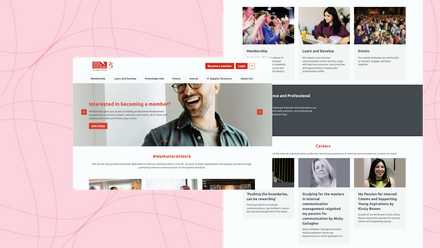
The IoIC, the Institute of Internal Communication, put the challenge clearly before they moved platforms: “Our HQ team only has 8 people. Every week hours of the team’s time were taken up with manual admin and moving data. How could I free up my team’s time and headspace to develop new content and member resources?” After moving to ReadyMembership, their membership grew by 52% and the team had the capacity to invest in the kind of work that actually moves the needle for members.
If your current membership portal is leaving your team to pick up tasks it should be handling automatically, it’s worth mapping out exactly where that time is going before your next renewal cycle begins. The gap between what your portal does and what it should do is often larger than it first appears, and the time savings from closing it tend to compound quickly.
ReadyMembership is a membership management platform built to handle the full membership lifecycle automatically, from renewals and payments through to personalization, directory management, and finance integration. If you’d like to see how it works in practice, book a demo with our team.